 Code Heaven
How AI is Changing WordPress Appointment Booking
By Code Heaven
The booking form has been the default for over a decade. Pick a service, pick a date, fill in your details, submit. It works — but barely. Customers abandon forms at alarming rates, staff spend hours managing appointments manually, and businesses leave money on the table because the experience feels stuck in 2015.
AI is changing this. Not the buzzword-laden, vaporware kind of AI — real, practical AI that replaces the booking form with a conversation, gives business owners a management assistant, and handles payment without leaving the chat.
This guide breaks down how AI appointment booking works, what it looks like in practice with Boo AI, and why it matters for WordPress businesses running Booknetic.
Why Traditional Booking Forms Are Losing
Here is the uncomfortable truth about traditional booking forms: they were designed for the business, not the customer. A typical WordPress booking form asks customers to navigate a multi-step wizard — select a service, choose a staff member, pick from a calendar, fill in personal details, then submit. Each step is a chance to drop off.
The numbers tell the story. According to industry research, form abandonment rates for multi-step forms hover between 40-60%. Mobile users fare even worse, with small date pickers and cramped form fields driving abandonment above 65% on some sites.
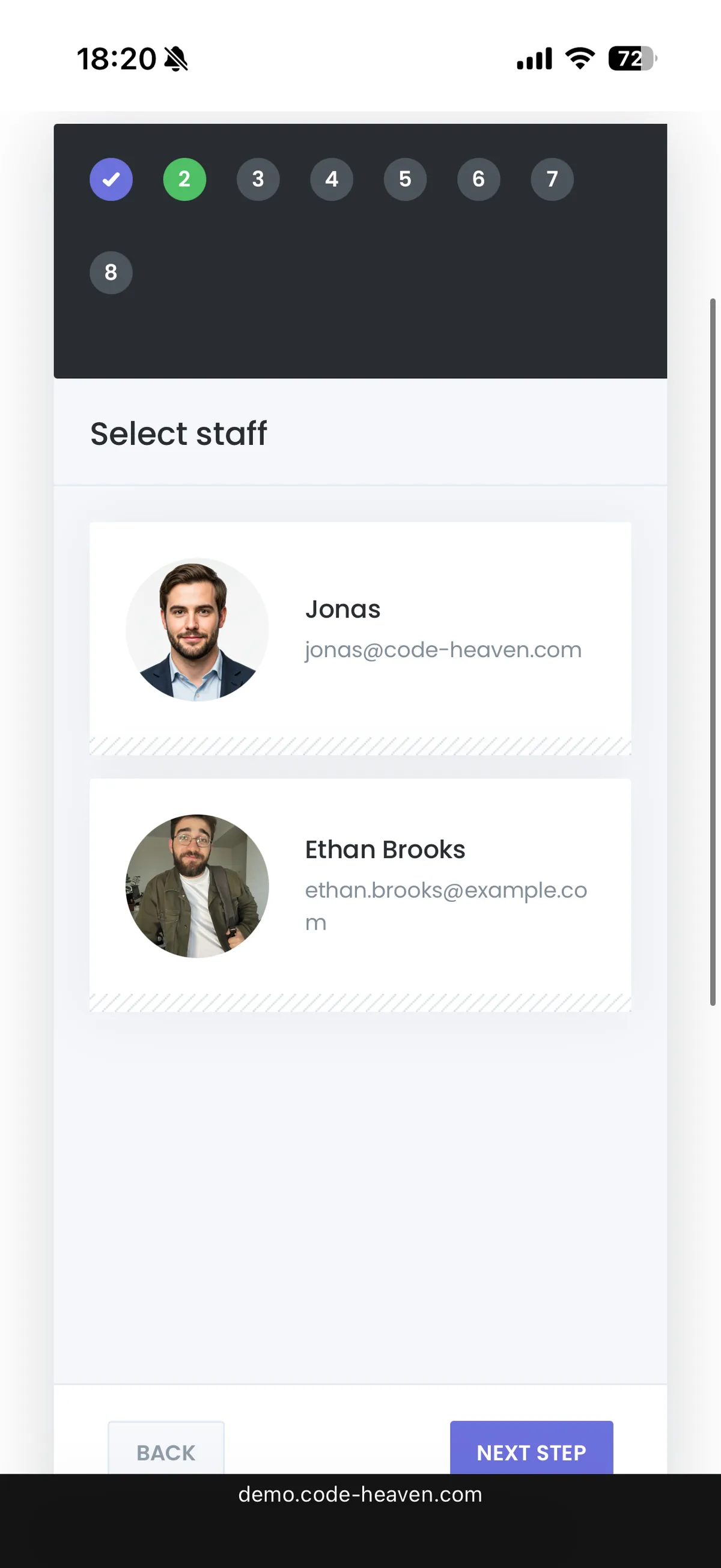
A traditional Booknetic booking form on mobile — an 8-step wizard where customers click through steps to select staff, date, time, and more.
The problems compound on the business side. Staff members toggle between the booking calendar, customer list, and service settings dozens of times per day. Simple questions — "How many appointments do we have tomorrow?" or "What was our revenue last month?" — require clicking through multiple admin screens.
The booking form is not broken. But it has reached its ceiling. The question is not whether something better is possible — it is whether that something is ready for production use today.
What AI Booking Actually Means (Not Just Chatbots)
When most people hear "AI booking," they think of chatbots — those scripted popup widgets that follow rigid decision trees and fall apart the moment someone asks an unexpected question. That is not what we are talking about.
AI booking — specifically, what is called agentic booking — means an AI system that actually understands your business data, can take real actions (create appointments, process payments, update records), and adapts to each conversation naturally. It is the difference between a phone tree and a human receptionist.
Here is what separates real AI booking from chatbot booking:
Context awareness. The AI knows your services, staff schedules, locations, and availability in real time. It does not ask customers to choose from a static list — it recommends based on what is actually available.
Action capability. The AI does not just collect information and email it to you. It creates the appointment, sends confirmations, processes payments, and updates your calendar — all within the conversation.
Natural language. Customers can say "I need a haircut next Tuesday afternoon" instead of clicking through five form steps. The AI parses intent, checks availability, and responds conversationally.
Two-way value. AI booking is not just for customers. Business owners get an admin assistant that can answer questions, pull reports, and manage appointments through chat.
How Boo AI Works — The Customer Side
On any page where your Booknetic booking panel appears, customers see a button labeled "Use AI Assistant." One click replaces the traditional form with a conversational chat interface.
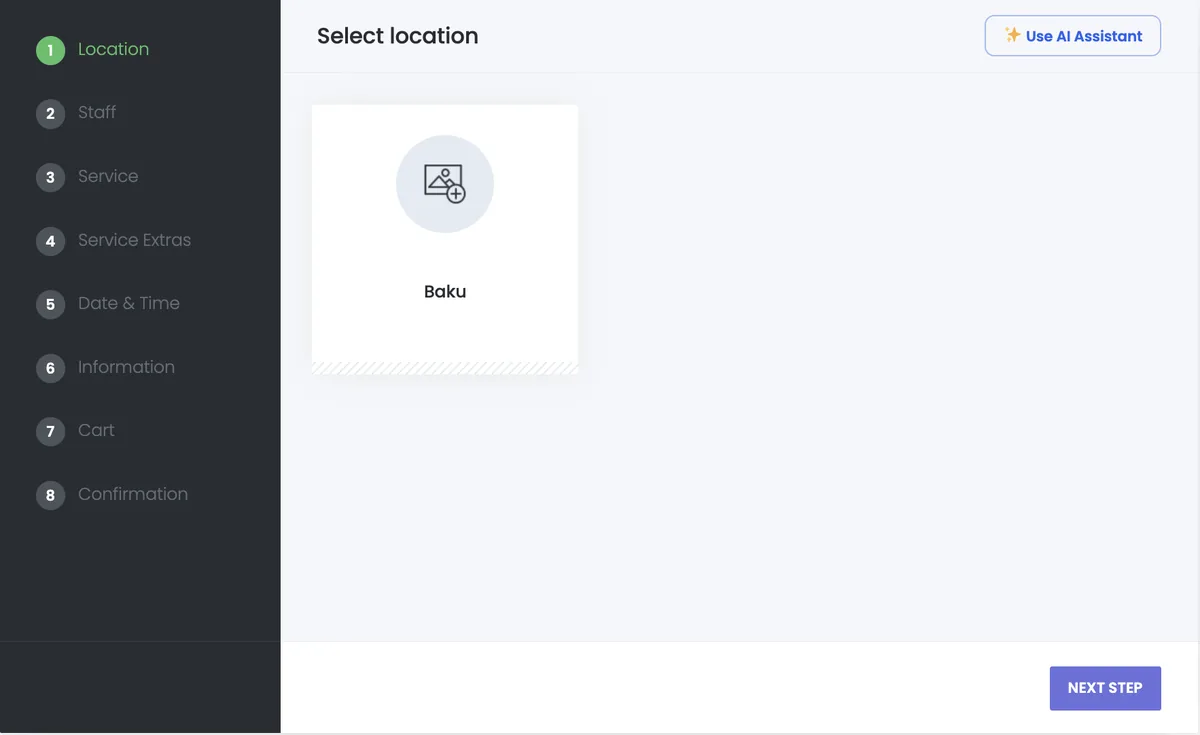
The Booknetic booking panel with the "Use AI Assistant" button — one click replaces the traditional form with a conversational AI.
From there, the experience feels like messaging a knowledgeable receptionist. The customer describes what they need, and Boo AI guides them through the booking flow with interactive UI elements — not just text responses.
Here is what the flow looks like step by step:
Service selection — Boo AI presents service cards based on what is available. Customers can browse visually or just type what they are looking for. The AI filters and recommends.
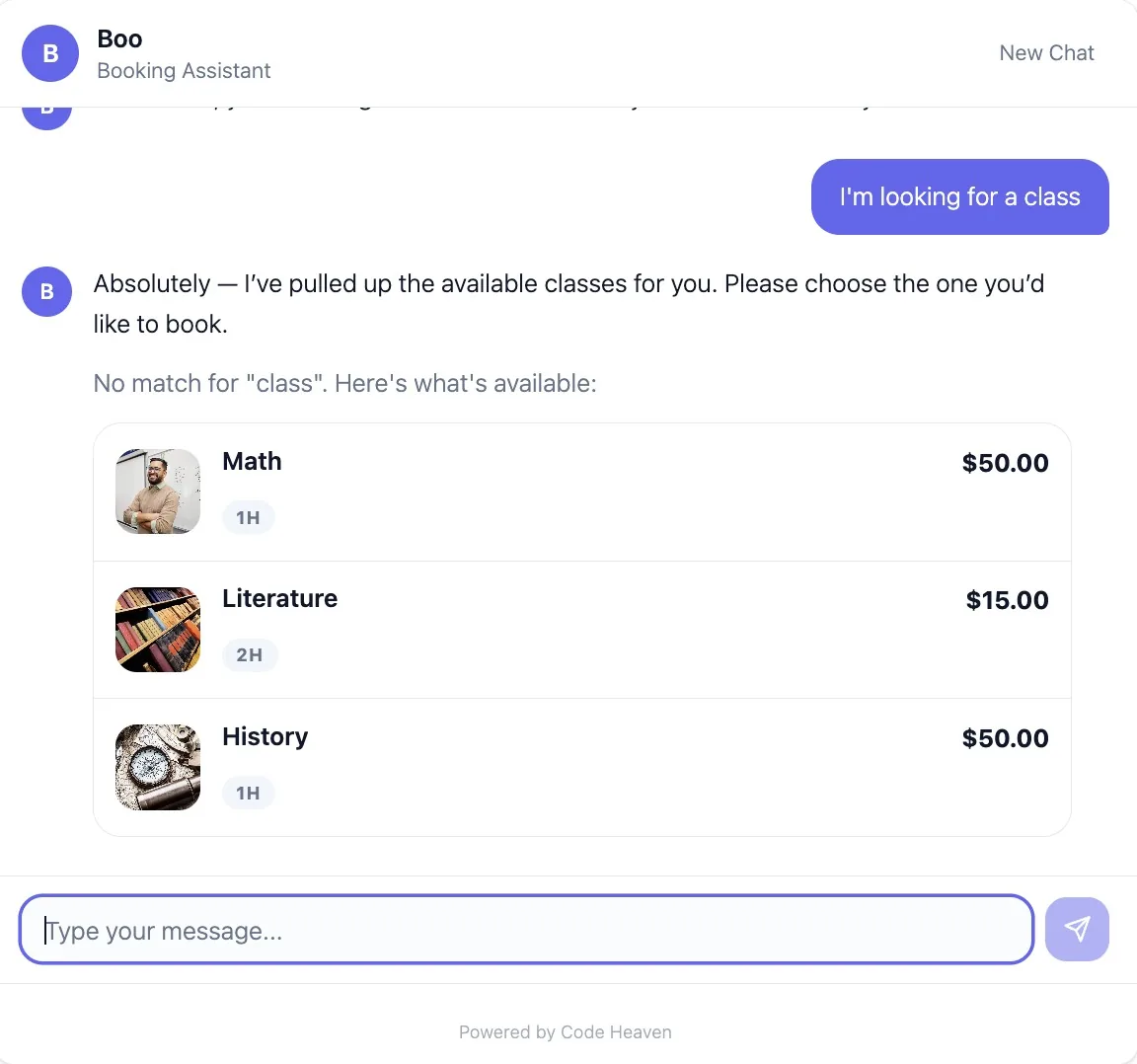
Boo AI presenting available services as interactive cards — customers simply tap to select.
Staff selection — If your business assigns specific staff to services, customers see staff cards with photos and availability. If staff selection is optional or hidden (configurable by admin), Boo AI skips this step automatically.
Date and time — Instead of a full-page calendar widget, Boo AI shows a compact calendar and available time slots directly in the chat. Customers pick a date, see what is open, and confirm — all without leaving the conversation.
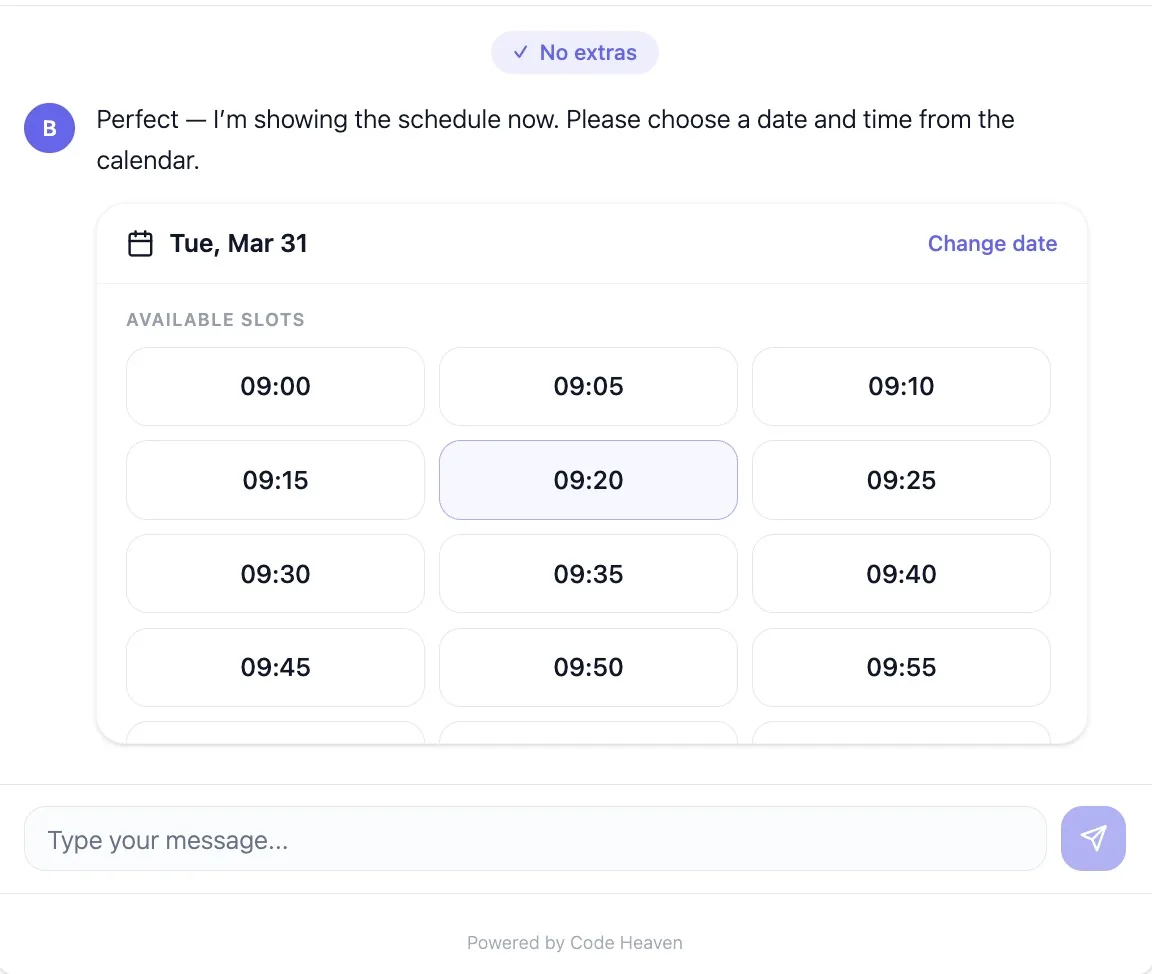
Available time slots displayed directly in the chat — customers pick a date and time without leaving the conversation.
Customer information — A clean inline form collects name, email, and phone. If the customer is already logged into WordPress, these fields pre-fill automatically.
Booking confirmation — Boo AI shows a summary card with the service, staff, date/time, and price breakdown. One tap to confirm.
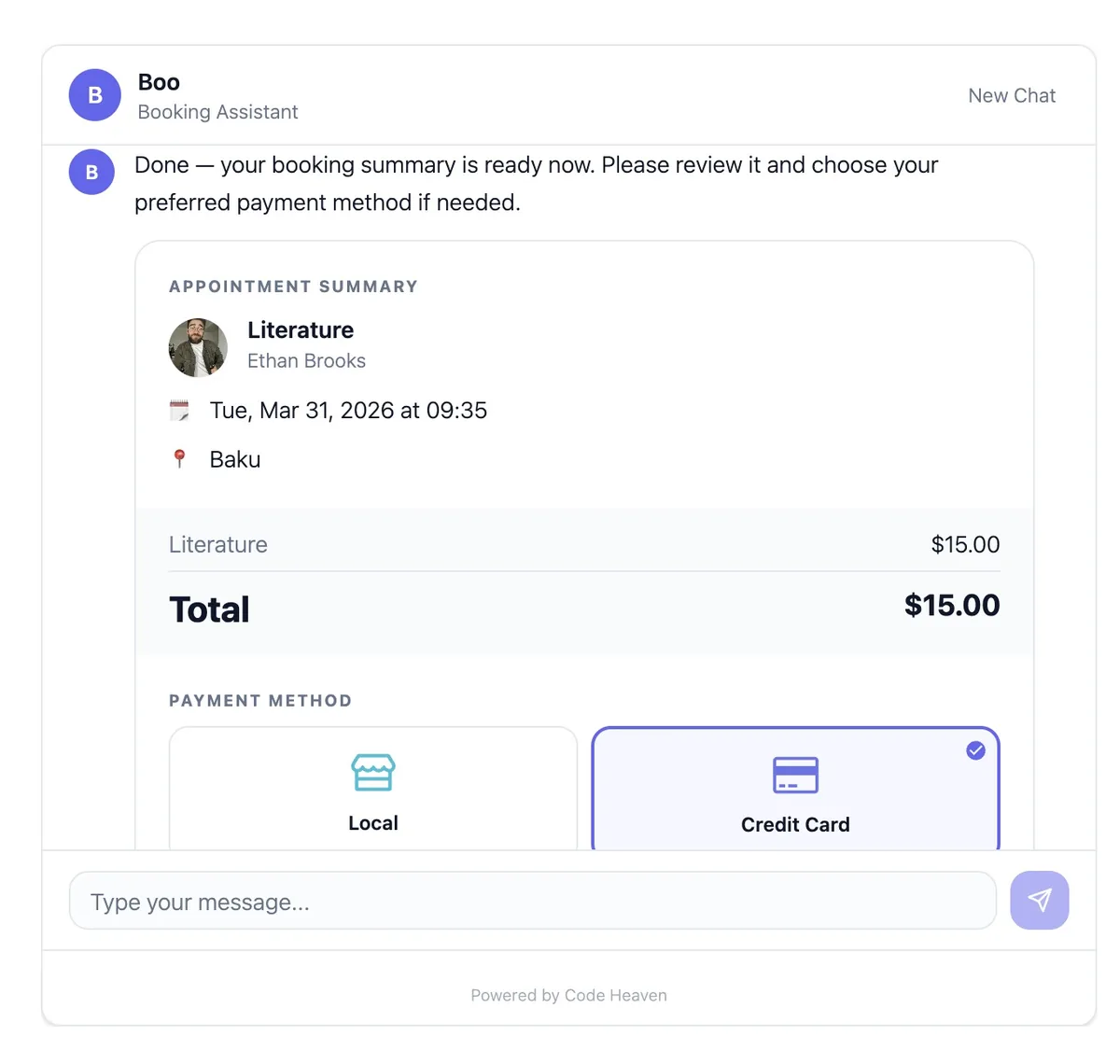
Booking summary with appointment details, pricing, and payment method selection — all within the chat.
The entire flow is multi-language. Boo AI detects your business language and responds accordingly — no translation plugins needed.
How Boo AI Works — The Admin Side
The customer-facing chat gets the attention, but the admin side is where Boo AI saves the most time. Inside your WordPress admin panel, you get a full chat interface for managing your business.
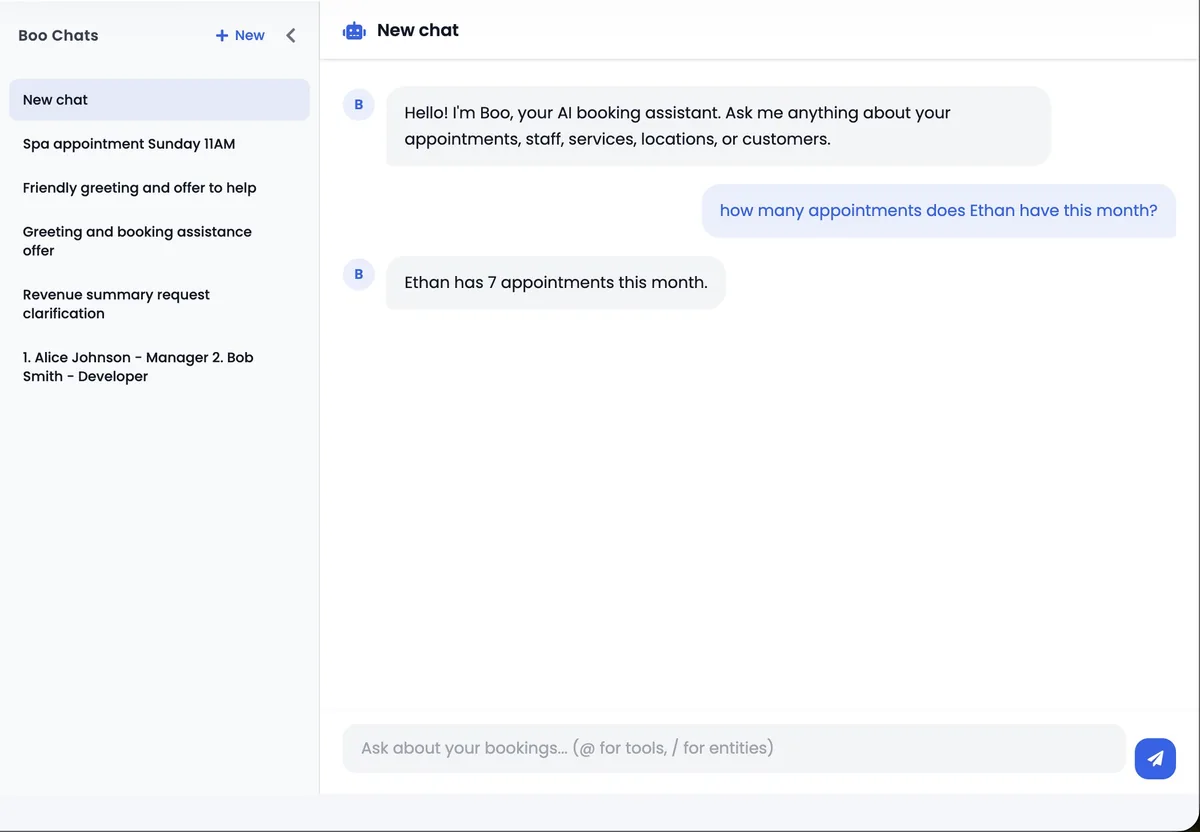
The Boo AI admin chat — sidebar with conversation history, main chat area with natural language queries and instant answers.
Think of it as a business assistant that knows everything about your appointments, staff, services, locations, customers, and revenue. You can ask questions in plain language:
"How many appointments do we have this week?"
"What was our revenue for March?"
"Reschedule John Smith to next Friday at 2pm."
"Create a new service called Deep Tissue Massage, 60 minutes, $90."
Boo AI has access to 31 management tools covering appointments, staff, services, locations, customers, revenue analytics, and payment stats. It can list, create, update, and delete records — and always asks for confirmation before making changes.
Ask anything about your business — appointments, revenue, staff schedules — and get instant answers.
Past conversations are saved and auto-titled in a sidebar, so you can always go back to previous queries. It is a running history of every management action you have taken through chat.
Payment Through Chat — The Differentiator
Most AI booking tools stop at the appointment confirmation. The customer books, then gets redirected to a separate payment page or asked to pay at the venue. Boo AI handles payment directly in the chat.
After a customer confirms their booking, a payment method selector appears right in the conversation. Boo AI supports every payment gateway that Booknetic supports — Stripe, PayPal, local/cash payments, and more.
Payment processed directly in the conversation — no redirect to a separate checkout page.
For online payments (Stripe, PayPal), a secure modal opens for card entry. Boo AI monitors the payment status and confirms when the transaction is complete. The customer never leaves the chat.
This matters because every redirect is a drop-off point. When you keep the entire flow — from initial message to payment confirmation — in a single conversation, completion rates go up. The customer does not need to navigate to a new page, re-enter context, or wonder if their booking went through.
Deposit payments are also supported. If your business requires a deposit rather than full upfront payment, Boo AI handles that seamlessly — showing the deposit amount and processing only what is required.
Getting Started: Three Steps
Setting up Boo AI takes minutes, not hours. Here is the process:
Step 1: Subscribe. Visit code-heaven.com/pricing and choose the plan that fits your setup. The Regular plan works for single WordPress sites running Booknetic. The SaaS plan is for Booknetic SaaS users who need multi-tenant support and white-labeling. Both plans include every feature — no tier gating.
Step 2: Install the plugin. Download the Boo AI plugin from your Code Heaven dashboard, upload it to WordPress, and activate it. Enter your license key in the Boo AI settings page.
Step 3: Start using it. That is it. The customer chat appears automatically on your Booknetic booking panels, and the admin chat is available in your WordPress sidebar. No API keys to configure, no AI models to choose, no complex setup. Subscribe and start.
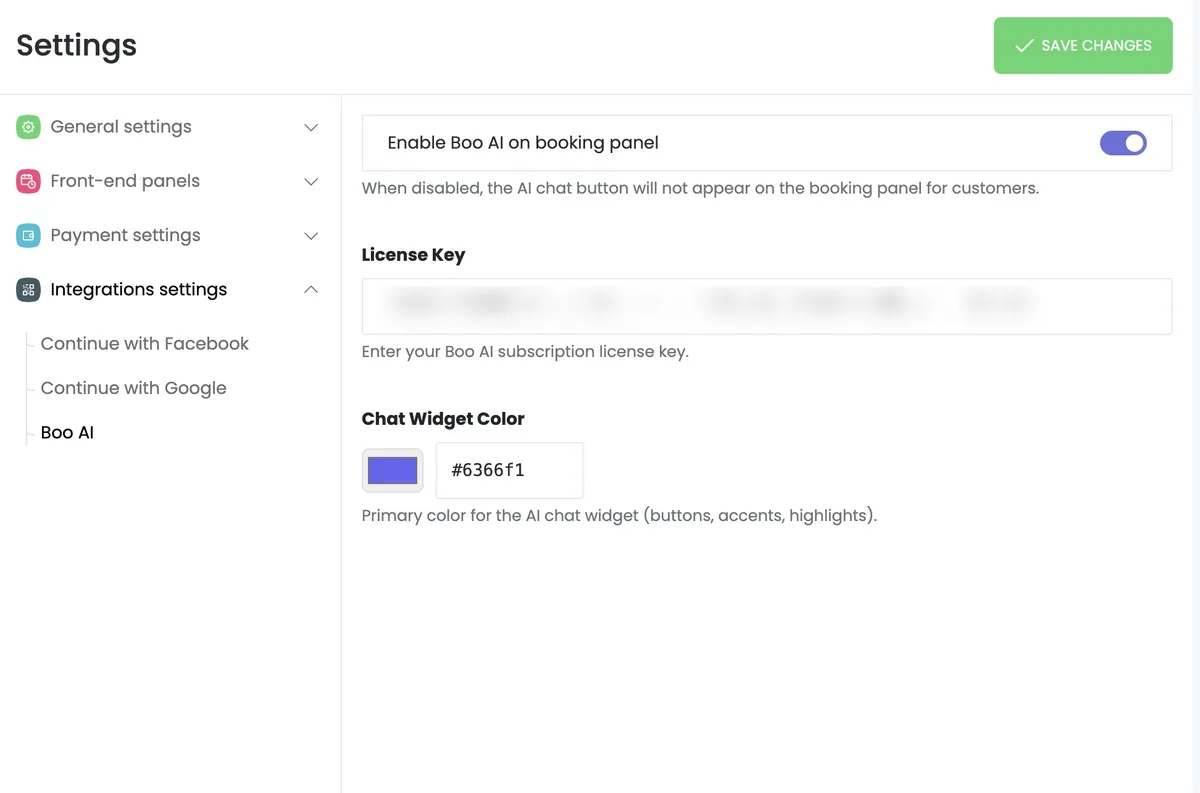
The entire Boo AI setup — toggle, license key, and color picker. Three fields, no API configuration.
Boo AI includes a 7-day free trial, so you can test the full experience before committing.
Who Benefits Most
AI booking is not limited to any single industry, but some businesses see outsized returns:
Salons and barbershops — High appointment volume, frequent rescheduling, multiple staff with different specialties. Boo AI handles the complexity without extra admin staff.
Healthcare and dental practices — Patients prefer conversational booking over clinical forms. The admin chat helps front-desk staff manage schedules faster.
Fitness studios and gyms — Class schedules, equipment bookings, and membership-based appointments all work through the chat.
Consulting and professional services — One-on-one appointments with specific availability windows. Boo AI checks real-time availability and handles the back-and-forth that usually requires email.
Multi-location businesses — Boo AI supports location selection in the booking flow, so customers choose where they want to go and see availability specific to that location.
If your business runs on Booknetic and you are tired of form-based booking, try Boo AI. The conversation is better than the form.